

Direct Download Links for Signed Documents
This guide explains how to use the direct download link provided in the webhook when a document is signed, allowing you to upload files directly to services that only accept open URL links.
Why Use Direct Download Links?
Section titled “Why Use Direct Download Links?”When integrating with services like Airtable, WhatsApp, Green API, and others, you may encounter a limitation: these services only accept files from open URLs and don’t support Make.com’s file structure.
In these cases, instead of using the standard “Get a Submission PDF” module, you can use the direct download link provided in the webhook data.
Benefits
Section titled “Benefits”- Simpler workflow: Skip the “Get a Submission PDF” module
- Direct integration: Upload files directly to services that require URL-based file uploads
- Faster processing: Fewer steps in your Make.com scenario
How It Works
Section titled “How It Works”Step 1: Set Up the Webhook
Section titled “Step 1: Set Up the Webhook”Configure the webhook exactly as described in the Watch New Form Submissions guide.
The key difference is that you won’t need to use the “Get a Submission PDF” module.
Step 2: Use the Direct Link
Section titled “Step 2: Use the Direct Link”When the webhook is triggered upon document signing, you’ll receive several data points, including:
- File URL: A direct download link to the signed PDF
- File Name: You can use the submission data to create a custom filename
Step 3: Map to Your Service
Section titled “Step 3: Map to Your Service”Instead of retrieving the PDF using the “Get a Submission PDF” module, directly map the webhook data to your target service.
Example: Uploading to Airtable
Section titled “Example: Uploading to Airtable”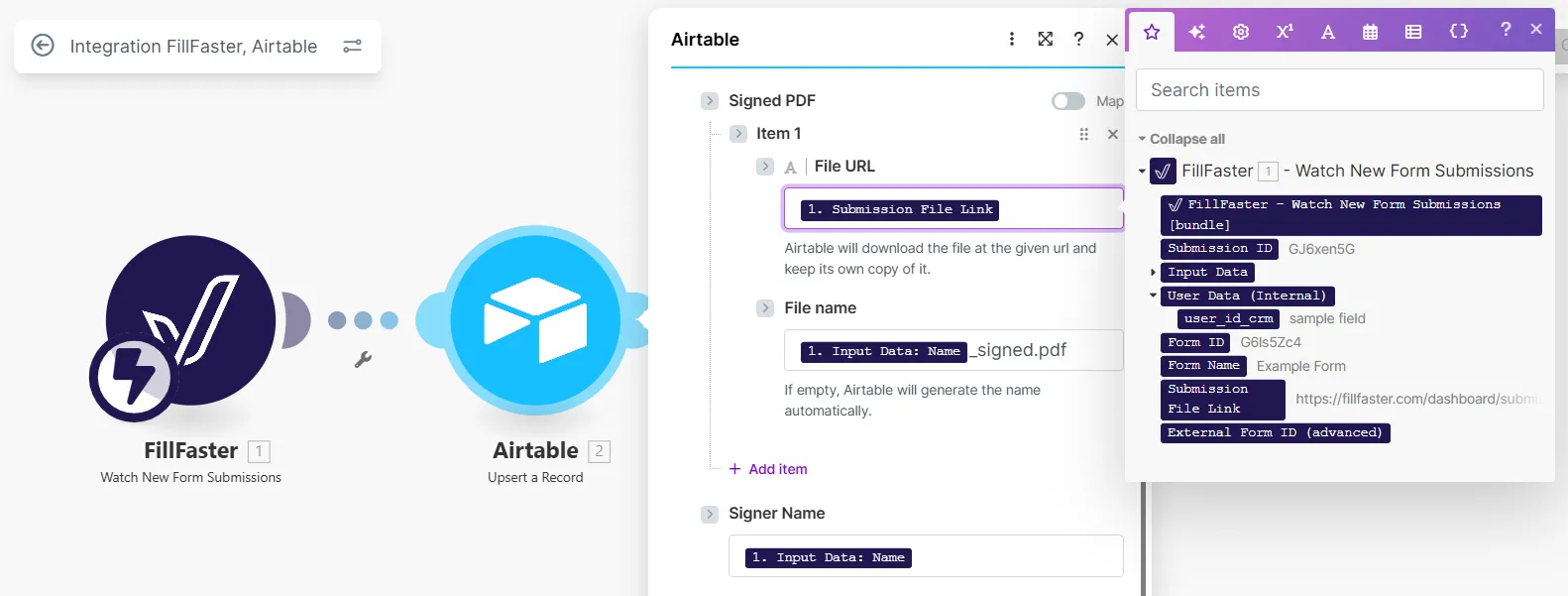
In the Airtable “Upsert a Record” module:
- File URL: Map the
1. Submission File Linkfrom the webhook data - File name: Map
1. Input Data: Nameand add the.pdfextension (e.g.,_signed.pdf)
This approach works with any service that accepts file URLs, such as:
- Airtable
- WhatsApp Business API
- Green API
- Google Drive (URL import)
- And many more
Comparison with Standard Method
Section titled “Comparison with Standard Method”Standard Method (with Get a Submission PDF)
Section titled “Standard Method (with Get a Submission PDF)”- Watch New Form Submission (webhook)
- Get a Submission PDF module
- Upload to service
Direct Link Method (simplified)
Section titled “Direct Link Method (simplified)”- Watch New Form Submission (webhook)
- Upload directly to service using the File URL
Important Notes
Section titled “Important Notes”- The direct download link is available immediately when the webhook is triggered
- The link remains valid and accessible for downloading the signed document
- This method is perfect for services that don’t support Make.com’s native file handling
- You can still access all other submission data (user info, form fields, etc.) from the webhook
By using this method, you can create more efficient integrations with services that require direct file URLs.